 VARAK
VARAKEdit the words a PDF was born with.
VARAK changes the text already inside a PDF, in the document's own font, so the page still looks like the page. Sign it, fill it, redact it, turn a scan into text. All of it on your Mac, iPad or iPhone, none of it on a server.
No subscription, no account, nothing uploaded. Editing text is free. Pro is one payment of US $9.99 for Mac, iPad and iPhone together, yours forever — try every Pro tool free for 3 days first. macOS 12 or later (Apple Silicon and Intel), iPadOS and iOS 17 or later.
The document's own font.
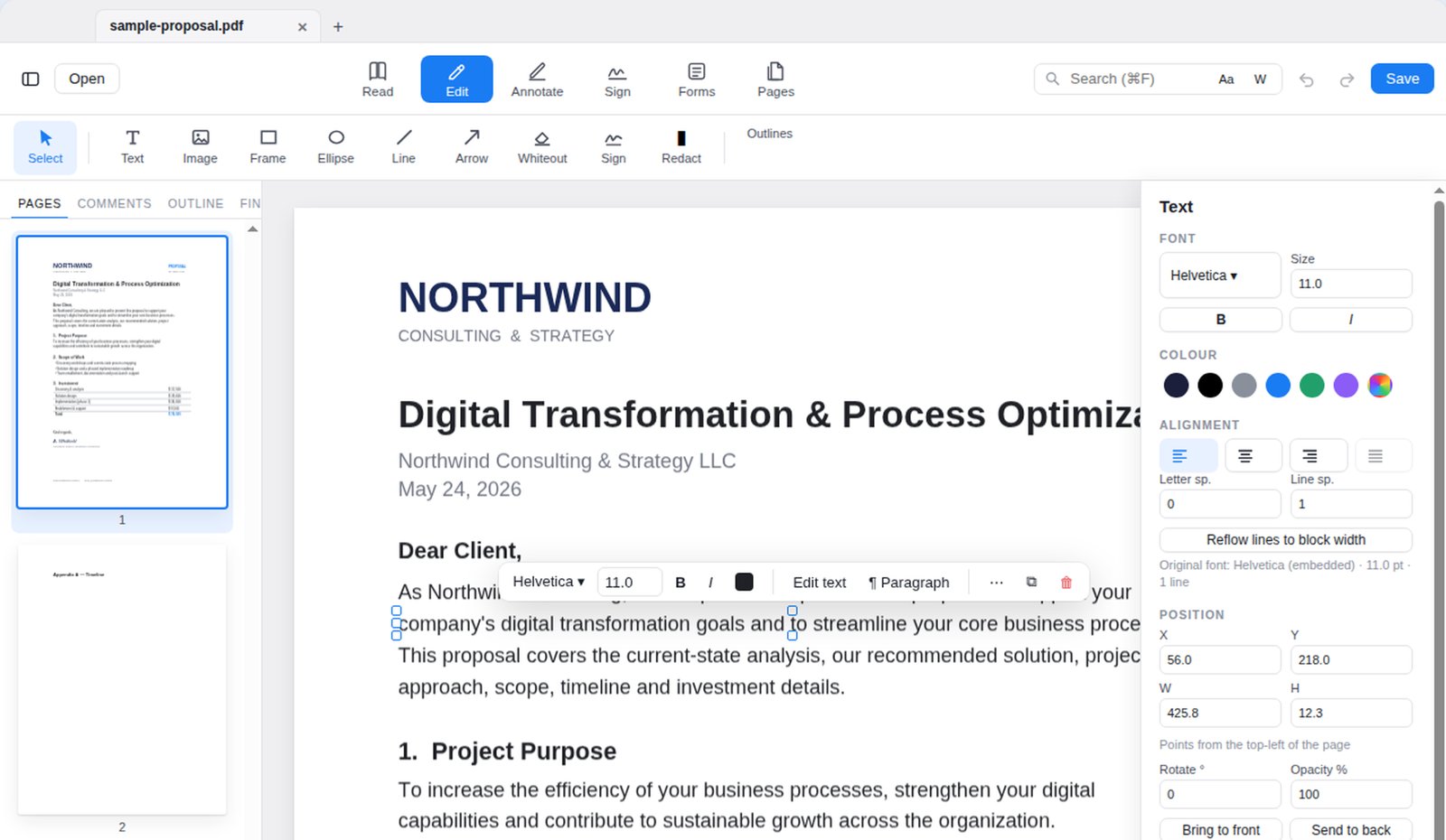
VARAK edits the words themselves rather than pasting a new text box over them: it keeps the font, size, colour and spacing, and reflows the paragraph as you type. When a font lacks a character, VARAK embeds the closest match and tells you, so accented, Cyrillic, Greek and every other script comes out right.
Your device, and nowhere else.
There is no account to create, no VARAK server, no analytics, and nothing that reads your documents but you. The only sync is optional and yours: on iPhone and iPad you can keep your signatures in your own iCloud. Optical character recognition, redaction, conversion: every one of them runs on your device. The Mac app doesn't even have permission to connect to the internet.
One payment, forever.
Editing and saving text, annotating, filling forms, signing, scanning and OCR, combining and organising pages are free forever, with no watermark. The professional tools are one in-app purchase of US $9.99 — bought once and yours on every Mac, iPad and iPhone signed in to your Apple Account. It does not renew and it does not expire. Try every Pro tool free for 3 days first; nothing is charged when the trial ends.
New in VARAK PDF 1.5
Now in 11 languages
English, Türkçe, Deutsch, Français, Español, Русский, 日本語, 简体中文, 한국어, Português (Brasil) and Italiano — menus, panels and messages, fitted to every window.
Your fonts come first
The font menus list the fonts already on your device first, as Word does — including the ones you installed yourself. VARAK's own fonts follow, clearly separated.
VARAK Font Pack
60 free font families for editing and new text, drawn in their own typeface right in the menu.
Live Editing, always on
Click or tap any line and type: the page updates as you write, in the document's own font.
A native Mac app
Rebuilt with Apple's own technologies: a much smaller download, Siri and Shortcuts, and the new translucent look on macOS Tahoe. Your settings and purchase carry over.
Text that fits
A long line can wrap within its box like a text box, a line never runs off the page unnoticed, and toolbars fit any window.
Six modes. Every PDF job.
Read, Edit, Annotate, Sign, Forms, Pages. The toolbar shows only the tools of the mode you're in, and the Inspector appears only when something is selected.
Edit real text, not a copy of it
Click a line and retype it. VARAK keeps the document's font, size, colour and spacing, reflows the paragraph as you type, and shows the original font, size and position in the Inspector so nothing drifts. Move, resize, recolour and delete text, images and shapes; add new text, pictures, lines and arrows. Replace All rewrites every occurrence in the document's own font.
Every save is verified before it touches your file: if the result wouldn't open correctly, VARAK refuses and leaves the original untouched.
Find anything, instantly
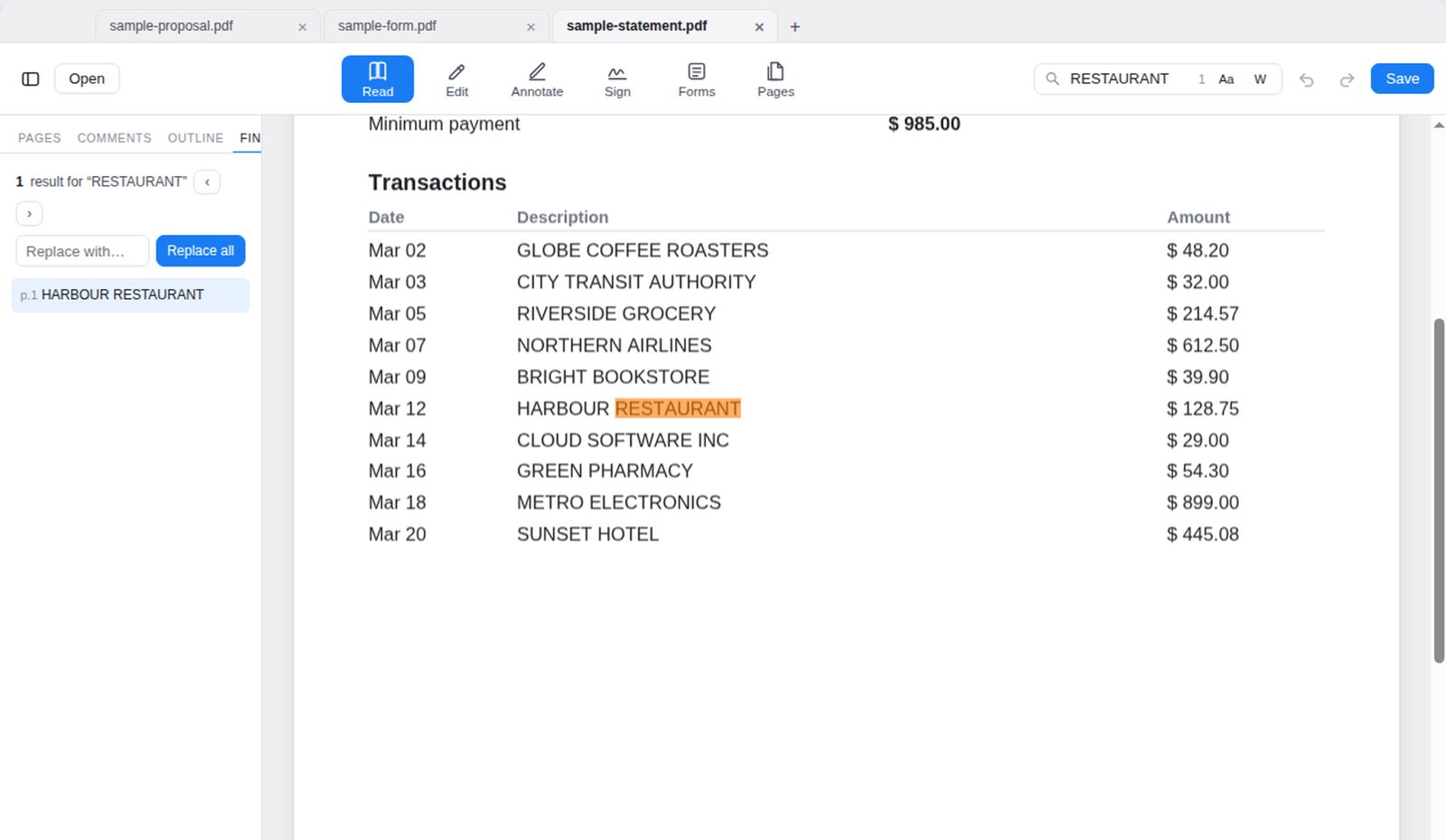
Search as you type across every page, jump between hits from the Find panel, and replace all occurrences in one move. Matching is accent-aware and accent-insensitive by default: istanbul finds İSTANBUL, sisli finds Şişli, the way Spotlight does. Invoices, statements and forms that break other editors simply open. Day, Night and Sepia appearances for long reading, without ever altering the file.
Highlight, comment, mark up
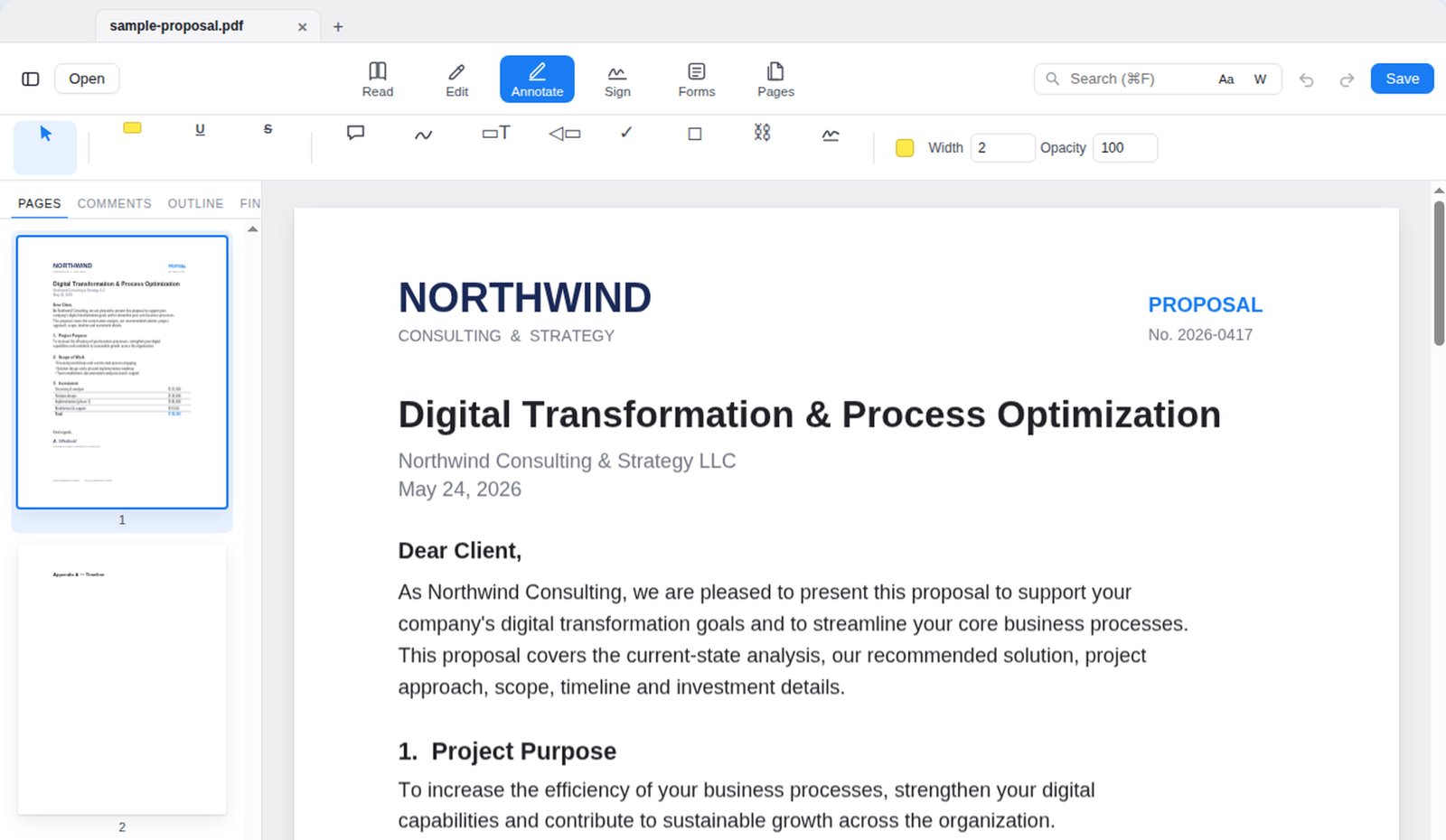
Highlight, underline, strike through, add sticky comments, draw freehand, add text boxes, callouts, stamps, shapes and links, and set colour, width and opacity from the bar. Every note is listed in the Comments panel and jumps to its place. Compare two PDFs to see what changed between versions. All of this is free.
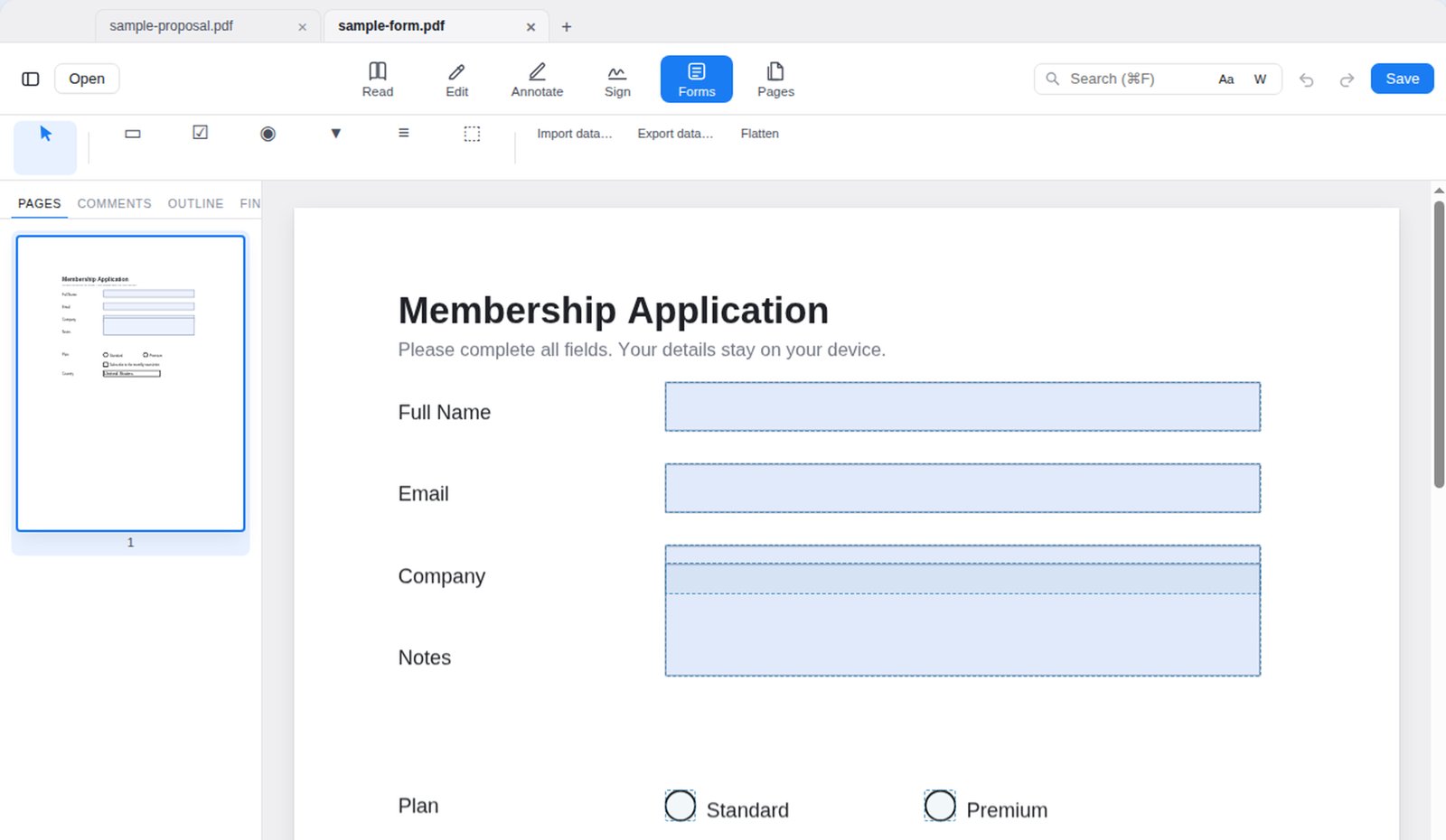
Fill any form, even ones other apps can't read
Text fields, checkboxes, radio buttons, dropdowns and lists, with Tab moving you through the form. VARAK rebuilds forms whose field catalogue was never written, so a "dead" form fills like any other, and the filled values render correctly in Preview and Acrobat afterwards. Build new fields, import and export form data, or flatten the form for sending.
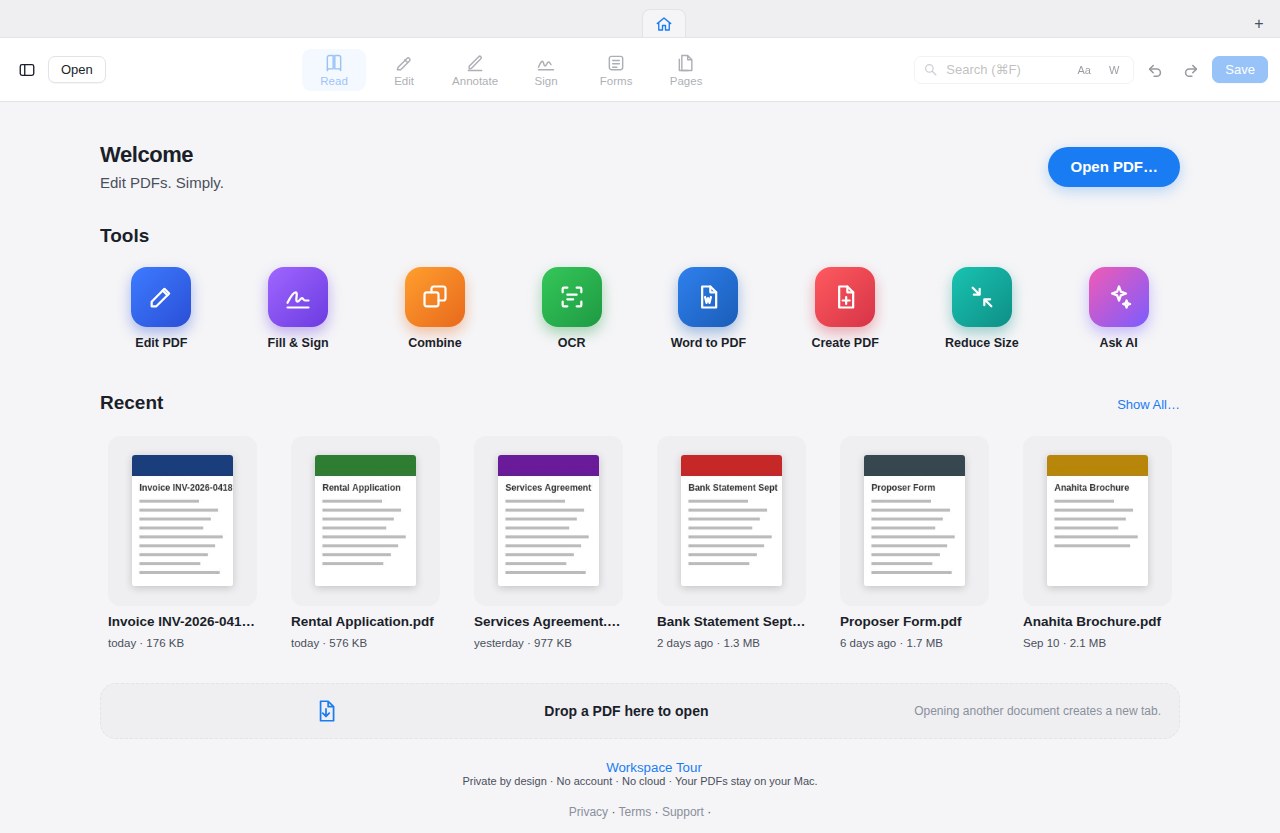
Every tool, one place
Home is always the first tab. Open a PDF or drop one on the window, pick up your last edit from the Continue card, or go straight to Create, Combine, OCR, Compress, Convert, Protect or Compare. Recent documents show a preview of the page you were on; unsaved-work recovery and a short tour are one click away.
Sign, organise, protect
Sign by hand, or by certificate
Draw, type or import a signature, keep a gallery of signatures and initials, place one with a click. Sign with a PKCS#12 certificate that verifies in Preview and Acrobat; any later edit removes the signature so a signed file can never be silently altered.
Organise pages
Rotate, reorder, duplicate, delete, insert, extract and split pages in a grid you can drag. Page numbers, Bates numbering, headers and footers. Combine files, including ones other apps refuse to copy.
Redact for real, protect for real
Black out an area and the text, images and graphics underneath are removed from the file, not just covered. Ask VARAK to find IBANs, card numbers, ID numbers, e-mails and phone numbers for you. Protect a file with a password, or remove one you know.
And the tools that make it a professional's editor
OCR, on your Mac
Recognise text in scanned pages, in many languages, then search, copy and edit it like any other PDF.
Statement to Excel
Turn a bank or card statement, even a scanned one, into a spreadsheet with the columns lined up. VARAK performs this workflow on-device.
Export
Word (.docx), images, plain text. Selected pages as a new PDF. Reduce file size without wrecking it.
Batch
Run compress, OCR, protect, redact, export and more across a whole folder in one go, with per-file failure isolation.
Document Health
Find what's wrong with a stubborn PDF and fix its rendering, encoding and structure without leaving the app.
Keyboard first
Every command works the same from the menu, the keyboard and the mouse. Full screen respects the notch.
One payment. Yours forever.
$9.99, once. Not a month, not a year, and not a trial that turns into a plan. A single in-app purchase through the App Store, and Pro is yours on every Mac, iPad and iPhone you sign in to. Try every Pro tool free for 3 days first — nothing is charged when it ends.
Download VARAK PDFPrice shown in US dollars; the App Store shows your local price. Restore Purchase brings Pro to a new Mac, iPad or iPhone.
Free, forever
- Edit and save text in the document's own font
- Open, read, search, copy and print; Day, Night and Sepia
- Highlight, underline, strike through, comments, freehand, shapes, stamps
- Fill forms and save them; signatures drawn, typed or imported
- Scan and OCR; combine and create PDFs; compress; passwords
- Rotate, reorder, delete, insert, extract and split pages; image and text export
Pro — one payment
- Statement to Excel, reviewed row by row
- Export to Word; Compare two PDFs
- Redaction that removes content; Find personal data
- Certificate signatures; Document Packs
- Bates numbering, headers and footers; Batch processing
- Save translated copies
Against the subscription editors
VARAK is designed around two choices: on-device document processing and a one-time Pro purchase instead of a recurring subscription.
| VARAK | Typical subscription editor | Free online converters | |
|---|---|---|---|
| What you pay | $9.99 once, for Mac, iPad and iPhone | A fee every month or year | Free, in exchange for your document |
| Where your PDF is processed | On your device only | Often uploaded to a cloud service | Uploaded to someone's server |
| Watermarks on your output | Never, not even in the trial | Varies by product | Varies |
| Account required | No | Yes | Usually |
| Edit existing text in its own font | Yes, with paragraph reflow | Varies by product | No |
| Accents, Cyrillic, Greek survive editing | Yes, verified on save | Varies by product | Varies |
| Redaction removes the content | Yes, from the file itself | In higher tiers | Usually only covers it |
| Statement to Excel, offline | Yes, including scans | Cloud only, or not at all | Cloud only |
| Refuses to save a broken file | Yes, SafeSave checks every save | No | No |
| Works with no internet | Entirely | Partly | No |
Comparison describes product categories in general terms as understood by the author at the time of writing; other products change and their makers describe them best. Nothing here is a claim about any named product.
Privacy is not a setting.
VARAK contains no code that talks to the internet. It cannot upload your documents, because there is nothing in it that could. Apple's App Store privacy label for VARAK reads Data Not Collected, and that is the whole policy.
Made for everyone.
VARAK was built by Erdal Beyoğlu after too many years of watching accented and non-Latin characters vanish from edited PDFs. Every alphabet was the first test, not an afterthought. The name means a folio, a written leaf.
Questions people ask
Is it really not a subscription?
Correct. VARAK PDF is a free download with one non-consumable in-app purchase, VARAK PDF Pro, at US $9.99. Buy it once and it stays unlocked on every Mac, iPad and iPhone signed in to your Apple Account. If you reinstall or get a new device, choose Restore Purchase.
What can I do without paying?
Edit and save text, annotate, fill and save forms, sign, scan and OCR, combine, compress and organise pages — with no time limit and no watermark, forever. On top of that you can try every Pro tool free for 3 days, whenever you choose to start the trial.
How does the free trial work?
When you first open a Pro tool, VARAK offers a 3-day trial. It starts only when you press the button, it unlocks every Pro tool, and when it ends nothing is charged — the Pro tools simply lock again until you decide to buy. It is not a subscription and never turns into one.
Will the trial put a watermark on my document?
No. VARAK never watermarks anything — not during the trial, not in a footer, not as reduced quality. A document you make during the trial is a real document you can send to a client. We don't damage your file to advertise ourselves.
Does VARAK ever send my documents anywhere?
No. OCR, redaction, conversion and signing all run on your device; there is no VARAK server. The Mac app doesn't even have permission to connect to the internet. The only network activity in the picture is Apple's own App Store handling the purchase, which VARAK never sees the details of.
Which devices does it run on?
Mac with macOS 12 Monterey or later (Apple Silicon and Intel), and iPad and iPhone with iPadOS or iOS 17 or later. VARAK PDF is distributed through the App Store, so it is sandboxed and reviewed by Apple.
Can it edit scanned documents?
Yes. Run OCR (many languages are built in) and the scan becomes searchable, copyable and editable. Retyping a line over a scan produces a printed-looking line in the scan's own ink.
Is the redaction permanent?
Yes. Redaction removes the text, images and graphics under the mark from the file itself, and VARAK confirms before doing so because it can't be undone. Review the result before sharing any redacted document; you remain responsible for what you send.
What about iPhone and iPad?
VARAK PDF runs natively on iPhone and iPad as well as the Mac, from the same App Store page. Pro is one purchase for all three: buy it on any of them and choose Restore Purchase on the others.
What can't it do yet?
Indic scripts, Thai, Myanmar and Khmer can be read but not retyped. Korean text is preserved but new Korean text can't be typed. Tables in Word export become paragraphs. PDF/A export and public-key-encrypted files are not supported in this version. The full list is on the support page.